



Windows Anytime Upgrade パック (Windows 7 Home Premium から Windows 7 Professional)


販売形態:パッケージ版 ライセンス形式:アップグレード版





本ページでは掲載するECサイトやメーカー等から購入実績などに基づいて手数料を受領しています。







Windows Anytime Upgrade パック (Windows 7 Home Premium から Windows 7 Professional)マイクロソフト
最安価格(税込):価格情報の登録がありません 発売日:2009年10月22日
『メモリー増設に伴い』 のクチコミ掲示板







 お気に入りに追加

OSソフト > マイクロソフト > Windows Anytime Upgrade パック (Windows 7 Home Premium から Windows 7 Professional)


 |
|---|
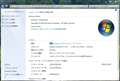
RamDskにそしてマッハドライブ。
それだけで6GB程を使ってしまい、メモリーを12GBから24GBに増設しました。
HomePremiumだと16GBまでの認識なので上記ソフトを導入すると正味使えるメモリーは10GB未満です。
ええい!っとばかりに本日、Professionalにアップグレード。
プロダクトキーの入力だけなので、簡単でした。
HomePremiumのディスクはそれ用のプロダクトキーで制限がかかっているだけで、中身はUltimateなのですね、知りませんでした。
書込番号:14178324
 0点
0点



プロダクトIDの入力をしないと、インストールするエディションはユーザーの自己申告になります。
書込番号:14178938 スマートフォンサイトからの書き込み
0点
クリーンインストールの時はHomePremiumのディスクを使って(当然ですが)アップデート用IDを打ち込むわけですよね?
元から在るHomePremiumのIDは入力必要無しと。
書込番号:14179269
0点

 |
|---|
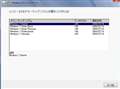
インストール時にエディションを選択できる! |
>HomePremiumのディスクはそれ用のプロダクトキーで制限がかかっているだけで、中身はUltimateなのですね
自分は以前にインストールディスクを誤って破損した時にいろいろ調た結果
Home Premiumのディスクをベースにクリーンインストール時にエンタープライズ以外のエディション
を選択できるディスクを作成した。
作成方法は下記の手順
eicfg_removal_utility.zipというソフトを利用してei.cfgを削除
要は添付写真のようにインストール時にエディションを選択してインストール
その後対応するプロダクトキーの入力でアクティベートする。という方法もあるよ!
雑知識にしかならんがネ(笑う)
書込番号:14181678
1点



このスレッドに書き込まれているキーワード
「マイクロソフト > Windows Anytime Upgrade パック (Windows 7 Home Premium から Windows 7 Professional)」の新着クチコミ
| 内容・タイトル | 返信数 | 最終投稿日時 |
|---|---|---|
  windows office windows office |
9 | 2012/10/23 19:51:34 |
  パソコンスクール パソコンスクール |
7 | 2012/08/21 16:21:04 |
| 普通にpro買うよりやすくないですか? |
2 | 2012/08/10 11:09:20 |
| リモート |
6 | 2012/07/21 21:46:30 |
  NTTXで6980円 NTTXで6980円 |
1 | 2012/06/17 0:02:55 |
 素人です Proにアップグレードすると設定が変わりますか? 素人です Proにアップグレードすると設定が変わりますか? |
8 | 2012/03/19 18:47:05 |
 メモリー増設に伴い メモリー増設に伴い |
3 | 2012/02/20 21:35:08 |
| Outlook Express |
3 | 2012/02/19 17:21:26 |
 ヨドバシアキバで9,080円! ヨドバシアキバで9,080円! |
1 | 2012/01/31 21:15:01 |
 レノボのG560 Win7 64bitを使っていますが レノボのG560 Win7 64bitを使っていますが |
5 | 2011/11/24 20:02:25 |
この製品の最安価格を見る
Windows Anytime Upgrade パック (Windows 7 Home Premium から Windows 7 Professional)
最安価格(税込): 価格情報の登録がありません 発売日:2009年10月22日
 <88
<88
のユーザーが価格変動や値下がり通知、クチコミ・レビュー通知、購入メモ等を利用中です
クチコミ掲示板検索
新着ピックアップリスト
-
【おすすめリスト】【2026最新】思い出を残す!おすすめDVD作成ソフト
-
【欲しいものリスト】予算40万新規PC
-
【欲しいものリスト】高いけどDDR5で組む
-
【その他】Full White Build
価格.comマガジン
注目トピックス




(パソコン)
OSソフト
(最近5年以内の発売・登録)






