



ROG STRIX Z790-F GAMING WIFI II
- Z790チップセットを搭載したゲーマー向けATXマザーボード(ソケットLGA1700)。第14/13/12世代intel Coreプロセッサーに対応する。
- LEDイルミネーション、PCIe 5.0対応PCIe×16スロット、5基のPCIe 4.0×4接続対応M.2スロットを装備。
- ネットワーク機能にはintel 2.5GbE、無線ネットワーク機能にはWi-Fi 7+Bluetooth 5.4を搭載。


フォームファクタ:ATX CPUソケット:LGA1700 チップセット:INTEL/Z790 詳細メモリタイプ:DIMM DDR5






本ページでは掲載するECサイトやメーカー等から購入実績などに基づいて手数料を受領しています。







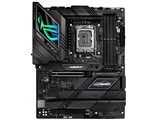

ROG STRIX Z790-F GAMING WIFI IIASUS
最安価格(税込):¥69,800
(前週比:±0  )
発売日:2023年10月21日
)
発売日:2023年10月21日
ROG STRIX Z790-F GAMING WIFI II のクチコミ掲示板
(71件)

このページのスレッド一覧(全1スレッド)

| 内容・タイトル | ナイスクチコミ数 | 返信数 | 最終投稿日時 |
|---|---|---|---|
 ROG STRIX Z790-F GAMING WIFI II BIOS 1301 ROG STRIX Z790-F GAMING WIFI II BIOS 1301 |
0 | 0 | 2024年6月1日 22:19 |
最初|前の6件|次の6件|最後






- 「質問の絞込み」の未返信、未解決は最新1年、解決済みは全期間のクチコミを表示しています


 お気に入りに追加

マザーボード > ASUS > ROG STRIX Z790-F GAMING WIFI II


ROG STRIX Z790-F GAMING WIFI II BIOS 1301
1. Introduce the ""Performance Preferences"" with options for Intel Default Settings (Performance/Extreme) and ASUS Advanced OC Profile
2. Redefine the factory defaults based on Intel’s new ""Intel Default Settings"" for various CPU SKUs.
3. Change F5 from ""Load Optimized Defaults"" to ""Reset to Defaults"".
4. Add warnings when users switch from the defaults to other settings.
Updating this BIOS will simultaneously update the corresponding intel ME to version 16.1.30.2307. Please note after you update this BIOS, the ME version remains the updated one even if you roll back to an older BIOS later.
Before running the USB BIOS Flashback tool, please rename the BIOS file (A5461.CAP) using BIOSRenamer."
2のIntel Default Settings とても大事ですね。
 0点
0点



最初|前の6件|次の6件|最後
この製品の最安価格を見る
 <49
<49
のユーザーが価格変動や値下がり通知、クチコミ・レビュー通知、購入メモ等を利用中です


クチコミ掲示板検索
新着ピックアップリスト
-
【欲しいものリスト】パソコン
-
【欲しいものリスト】エアコン
-
【Myコレクション】2026良コスパゲーミングPC(AMD)
-
【Myコレクション】2026良コスパゲーミングPC(インテル)
-
【欲しいものリスト】生成AI用
価格.comマガジン
注目トピックス




(パソコン)
マザーボード
(最近3年以内の発売・登録)






