




このページのスレッド一覧(全83スレッド)

| 内容・タイトル | ナイスクチコミ数 | 返信数 | 最終投稿日時 |
|---|---|---|---|
 DSDボタンは光らせられません(I2S入力が必要らしい)。 DSDボタンは光らせられません(I2S入力が必要らしい)。 |
4 | 2 | 2025年11月4日 16:21 |
| iPhone17 proで起動しなくなった |
1 | 0 | 2025年10月21日 19:48 |
| 光接続で |
1 | 1 | 2025年8月31日 23:00 |
| 低クオリティなスクリーン、OLEDディスプレイ |
5 | 0 | 2025年5月24日 22:13 |
| AQUOS R9とのBT接続ダメダメです… |
2 | 1 | 2025年8月16日 12:44 |
| 電池もち |
1 | 1 | 2025年5月17日 19:04 |






- 「質問の絞込み」の未返信、未解決は最新1年、解決済みは全期間のクチコミを表示しています


 お気に入りに追加

ヘッドホンアンプ・DAC > PS Audio > NuWave DSD [ブラック]


 |
|---|
説明書の記載部分 |
アンプ更新で、DSDの実力を試してみたいと画策しました。
Mac,Win,iPhoneから、入手したDSDファイルを再生してみましたが、DSDランプ点灯には至りません。
Mac/WinはJRiver MC34を使い、iphoneではmora playerです。
いずれの環境でも、DSDファイルを再生は出来ても、DSDランプは点かず、PCMランプのままです。
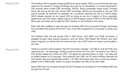
DoPでDSDの能力は示しているとの説明書表記(PlayingDSDの項目)ですが、NuWaveDSDにおいて、
DSDボタンを光らせるにはI2Sインプットが必要と認識しました。
“Native DSD that has not gone through the DoP process can be played on the NuWave DSD only
through the I2S input.”
このクチコミ掲示板にあるDSD再生についての詳細を理解しずらかったのが今回の試みの始まりです。(https://bbs.kakaku.com/bbs/K0000824516/SortID=20438750/#tab)
DSD-Directを試してみたかったのですが、上記を経てDirect再生は断念し、DSDファイルは不要と判断した次第です。
ただ、DoPでのDSDファイルはALACより、まろやか、一塊な音の印象はありました。
 2点
2点




①JRiverのDSD出力設定は、DSD to PCM conversionがONになってないか
②ドライバーはインストールしてあり、正しく指定されているか
③ファームは最新ですか?
初期ファームはDoP認識が不安定との書き込みもあるようです。
あたりはどうでしょう。
書込番号:26331769
2点

>響仁さん
Owner's Reference NuWave DSD
https://data.heimkinowelt.at/d/bed/p/ps-audio-nuwave-dsd-bed-a31369.pdf
[Supported formatsand rates]
The NuWave DSD supports both PCM and DSD audio signals. PCM singals of up to 192kHz, 32 bit
are supported, as well as double rate DSD in the DoP format. Native DSD can be played over I2 S.
[Playing DSD]
The NuWave DSD is capable of playing DSD as its name implies. DSD is a one bit format that many
regard as the closest to analog recordings and prize for its naturalness in musical presentation.
Few physical discs contain DSD recordings. SACDs, Sony’s proprietary Super Audio Compact
Discs, are among the few that contain DSD recordings. SACDs are encrypted so the raw DSD
cannot typically be extracted for playback via a computer, requiring the use of a SACD player.
SACD players typically do not output DSD as doing so can be in violation of Sony copyrights
agreements with their artists. Digital outputs on SACD players output PCM from the SACD’s Red
Book layer and these will not light the DSD indicator on the NuWave’s front panel.
Most DSD fi les available to play through the NuWave DSD will be acquired through downloads
from providers that support the format. Thus, most DSD is played from a computer or server over
USB.
The NuWave DSD will only accept DSD in DoP format. DoP (DSD over PCM) conversion is
available through many popular programs, such as JRiver, DSD Master (Bit Perfect), and other
player programs, as well as built into some servers. Use of DoP does not impact sound quality
in any way.
"how should we play dsd files with the ps audio nuwave dsd dac?"
Google AI's Answer:
"To play DSD files with the PS Audio NuWave DSD DAC, you must connect a computer to the DAC via the USB or I2S input, use specialized music playback software capable of handling DSD, and ensure the DSD signal is transmitted using the DSD over PCM (DoP) method via USB, or natively via I2S.
1. Hardware Connection
-Computer (Recommended Source): Connect your computer to the NuWave DSD using a high-quality USB cable. Shorter cables are generally better.
-I2S (Alternative Source): If you have a compatible transport (such as a PS Audio PerfectWave Memory Player) with an I2S output (HDMI interface), you can use this connection for native DSD playback.
-Power On: Ensure all components are powered off before connecting, then turn them on.
2. Driver Installation (Windows Users Only)
-Mac Users: No extra drivers are needed, as they are built into the operating system.
-Windows Users: You must download and install the specific USB driver from the PS Audio website. Once the driver is installed, select the PS Audio DAC as the default audio output device in your Windows sound settings.
3. Software Configuration
Music Playback Software: Standard computer operating systems do not natively recognize DSD files, so you need specialized software that can handle the files and output them to the DAC. Popular options include:
-JRiver Media Center
-Audirvana
-Roon
-Foobar2000 (with specific DSD components and configuration)
Software Settings: In your chosen software's audio/playback settings:
-Select the PS Audio NuWave DSD DAC as the output device.
-Enable DSD over PCM (DoP) output mode. The software "tricks" the computer by packaging the DSD file to appear as PCM data; the NuWave DSD then recognizes and unpacks this into a pure DSD stream.
-Ensure the output is a "bit-perfect" signal, meaning no internal digital signal processing (DSP) or volume control is applied in the software. Set the software volume to 100%.
4. Verification
When a DSD file is successfully playing, the DSD indicator light on the front panel of the NuWave DSD DAC should be illuminated.
書込番号:26332169
0点

ヘッドホンアンプ・DAC > Astell&Kern > Astell&Kern AK HC4 IRV-AK-HC4 [Moon Silver]

 |
|---|
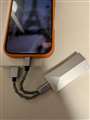
iPhone17 proに機種編し、AK HC4を接続したところ電源LEDが点灯すらしなくなりました。
メーカーに問い合わを入れて、メーカーも認識している模様。
https://x.com/aiuto_audio/status/1980200022475206950
エックスでいろいろと情報を探っていると電力不足では、という書き込みを見つけ、
iBasso Audio CB19というケーブルで接続したところ無事に起動しました。
とりあえずはこれで利用していますが、メーカーさん(またはappleさん)が対応してくれることを願っています。
1点
ヘッドホンアンプ・DAC > FiiO > K9 AKM FIO-K9AKM-B
光ケーブルの差込が甘かったようです。テレビ側で刺しなおしたら途切れがなくなりました。HP-A8は刺しこみが甘くても許容したようです
書込番号:26278480
1点
ヘッドホンアンプ・DAC > Shanling > SHANLING H7 [Titanium]

 |
 |
 |
 |
|---|---|---|---|
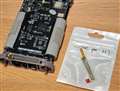
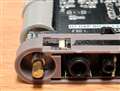
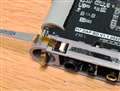
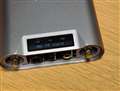
黒い部分を立てる |
穴に爪楊枝等を入れ押し込み黒い部分を倒しロック |
発売間もなくアリエクオフィシャルストアで購入しましたが、
半年ほどで半分表示されなくなり、一年経たずに何も表示されなくなりました。
中古やHeadfiでも報告ありますがダメなやつはダメみたいですね。
サポートへの連絡が面倒だったので放置してましたが
アリエクオフィシャルで普通に売ってたので買って交換してみました。
一応保守品は選別品らしいです。
分解動画はH7 Disassemblyで出てきます。
ifiもそうですがOLEDなんて使うなよって感じです。
5点
ヘッドホンアンプ・DAC > FiiO > BTR17 FIO-BTR17-B [Black]


同じシャープですがsense9でしたらLDACでもapt x adaptiveでも繋がりますね。
書込番号:26264837 スマートフォンサイトからの書き込み
1点
ヘッドホンアンプ・DAC > FiiO > BTR15 FIO-BTR15-L [Dark Blue]

https://www.fiio.jp/products/btr15/
最大約8時間
※「Phoneモード」のみ最大約3時間
なので、メーカー公表スペックよりはもっているようですね。
まあ、買う前から分かっていたことだとは思いますが…
書込番号:26181931
1点
クチコミ掲示板検索
新着ピックアップリスト
-
【欲しいものリスト】今、自作PCを作るなら
-
【欲しいものリスト】canon移行案
-
【Myコレクション】windows11に対応で購入
-
【その他】原神用?
-
【欲しいものリスト】自作PC
価格.comマガジン
注目トピックス

(家電)
ヘッドホンアンプ・DAC
(最近3年以内の発売・登録)






