




このページのスレッド一覧(全9404スレッド)

| 内容・タイトル | ナイスクチコミ数 | 返信数 | 最終投稿日時 |
|---|---|---|---|
 コーデック使用時のランプ表示 コーデック使用時のランプ表示 |
0 | 3 | 2025年11月9日 08:10 |
 DSDボタンは光らせられません(I2S入力が必要らしい)。 DSDボタンは光らせられません(I2S入力が必要らしい)。 |
4 | 2 | 2025年11月4日 16:21 |
 やっと納得できる音質になりました^^。 やっと納得できる音質になりました^^。 |
1 | 0 | 2025年11月2日 03:02 |
| ファームウエア |
1 | 0 | 2025年11月1日 08:43 |
| I-ODATA製サウンドジェニックとの接続について。教えてください |
321 | 3 | 2025年10月30日 19:25 |
 じじいには厳しい じじいには厳しい |
8 | 15 | 2025年11月19日 19:54 |






- 「質問の絞込み」の未返信、未解決は最新1年、解決済みは全期間のクチコミを表示しています


 お気に入りに追加

ヘッドホンアンプ・DAC > FiiO > BR13 FIO-BR13


SONY WH-1000XM5
BOSE QC Ultra Headphones(第1世代)
PCと接続してAMAZON MUSIC UNLIMITEDで利用検討中ですが、
コーデック使用時LDAC利用時、aptxAdaptive使用時に外観で
ランプ表示などでわかりますか。ご存じの方教えてくださいませ。
 0点
0点




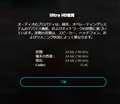
ディスプレイの表示例です。
https://chatgpt.com/c/690448f2-4c1c-8324-b2da-ad7545ba14e9
>PCと接続してAMAZON MUSIC UNLIMITEDで利用検討中ですが、
PC⇒(BT)⇒BR13⇒(有線)⇒WH-1000XM5・QC Ultra Headphones
で使用したいということでしょうか。
BR13はレシーバーなので、トランスミッターとしては使用できないです。
WH-1000XM5・QC Ultra Headphonesと同じくBluetoothの受信専用機です。
PCからBluetoothの送信機として使用したいのであればFiio BTA30 PRO
などトランスミッター機能がある機器を使用したほうが。
書込番号:26335491
0点
URL違ってました。
https://moonstarreviews.net/wp-content/uploads/20231029_182008-01-MR-scaled.jpeg
書込番号:26335543
0点
PC⇒(USB)⇒BR13⇒(BT)⇒WH-1000XM5・QC Ultra Headphonesです。
上記接続は出来ないのですね。
ありがとうございました。
書込番号:26335763
0点


ヘッドホンアンプ・DAC > PS Audio > NuWave DSD [ブラック]

 |
|---|
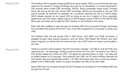
説明書の記載部分 |
アンプ更新で、DSDの実力を試してみたいと画策しました。
Mac,Win,iPhoneから、入手したDSDファイルを再生してみましたが、DSDランプ点灯には至りません。
Mac/WinはJRiver MC34を使い、iphoneではmora playerです。
いずれの環境でも、DSDファイルを再生は出来ても、DSDランプは点かず、PCMランプのままです。
DoPでDSDの能力は示しているとの説明書表記(PlayingDSDの項目)ですが、NuWaveDSDにおいて、
DSDボタンを光らせるにはI2Sインプットが必要と認識しました。
“Native DSD that has not gone through the DoP process can be played on the NuWave DSD only
through the I2S input.”
このクチコミ掲示板にあるDSD再生についての詳細を理解しずらかったのが今回の試みの始まりです。(https://bbs.kakaku.com/bbs/K0000824516/SortID=20438750/#tab)
DSD-Directを試してみたかったのですが、上記を経てDirect再生は断念し、DSDファイルは不要と判断した次第です。
ただ、DoPでのDSDファイルはALACより、まろやか、一塊な音の印象はありました。
2点
①JRiverのDSD出力設定は、DSD to PCM conversionがONになってないか
②ドライバーはインストールしてあり、正しく指定されているか
③ファームは最新ですか?
初期ファームはDoP認識が不安定との書き込みもあるようです。
あたりはどうでしょう。
書込番号:26331769
2点

>響仁さん
Owner's Reference NuWave DSD
https://data.heimkinowelt.at/d/bed/p/ps-audio-nuwave-dsd-bed-a31369.pdf
[Supported formatsand rates]
The NuWave DSD supports both PCM and DSD audio signals. PCM singals of up to 192kHz, 32 bit
are supported, as well as double rate DSD in the DoP format. Native DSD can be played over I2 S.
[Playing DSD]
The NuWave DSD is capable of playing DSD as its name implies. DSD is a one bit format that many
regard as the closest to analog recordings and prize for its naturalness in musical presentation.
Few physical discs contain DSD recordings. SACDs, Sony’s proprietary Super Audio Compact
Discs, are among the few that contain DSD recordings. SACDs are encrypted so the raw DSD
cannot typically be extracted for playback via a computer, requiring the use of a SACD player.
SACD players typically do not output DSD as doing so can be in violation of Sony copyrights
agreements with their artists. Digital outputs on SACD players output PCM from the SACD’s Red
Book layer and these will not light the DSD indicator on the NuWave’s front panel.
Most DSD fi les available to play through the NuWave DSD will be acquired through downloads
from providers that support the format. Thus, most DSD is played from a computer or server over
USB.
The NuWave DSD will only accept DSD in DoP format. DoP (DSD over PCM) conversion is
available through many popular programs, such as JRiver, DSD Master (Bit Perfect), and other
player programs, as well as built into some servers. Use of DoP does not impact sound quality
in any way.
"how should we play dsd files with the ps audio nuwave dsd dac?"
Google AI's Answer:
"To play DSD files with the PS Audio NuWave DSD DAC, you must connect a computer to the DAC via the USB or I2S input, use specialized music playback software capable of handling DSD, and ensure the DSD signal is transmitted using the DSD over PCM (DoP) method via USB, or natively via I2S.
1. Hardware Connection
-Computer (Recommended Source): Connect your computer to the NuWave DSD using a high-quality USB cable. Shorter cables are generally better.
-I2S (Alternative Source): If you have a compatible transport (such as a PS Audio PerfectWave Memory Player) with an I2S output (HDMI interface), you can use this connection for native DSD playback.
-Power On: Ensure all components are powered off before connecting, then turn them on.
2. Driver Installation (Windows Users Only)
-Mac Users: No extra drivers are needed, as they are built into the operating system.
-Windows Users: You must download and install the specific USB driver from the PS Audio website. Once the driver is installed, select the PS Audio DAC as the default audio output device in your Windows sound settings.
3. Software Configuration
Music Playback Software: Standard computer operating systems do not natively recognize DSD files, so you need specialized software that can handle the files and output them to the DAC. Popular options include:
-JRiver Media Center
-Audirvana
-Roon
-Foobar2000 (with specific DSD components and configuration)
Software Settings: In your chosen software's audio/playback settings:
-Select the PS Audio NuWave DSD DAC as the output device.
-Enable DSD over PCM (DoP) output mode. The software "tricks" the computer by packaging the DSD file to appear as PCM data; the NuWave DSD then recognizes and unpacks this into a pure DSD stream.
-Ensure the output is a "bit-perfect" signal, meaning no internal digital signal processing (DSP) or volume control is applied in the software. Set the software volume to 100%.
4. Verification
When a DSD file is successfully playing, the DSD indicator light on the front panel of the NuWave DSD DAC should be illuminated.
書込番号:26332169
0点

ヘッドホンアンプ・DAC > iBasso Audio > iBasso Jr. Macaron [Blue]

 |
|---|
パソコンでアマゾンミュージックアンリミテッドのウルトラHDやHDを、
このIBASSOJR マカロン→ソニーのMDR-CD900STで聞いていても
どうも納得できる音がしてなかったんです。
この↓下記のマカロンのサポート情報よりドライバーをダウンロードして
https://www.musinltd.com/portal/article/index.html?id=69
アマゾンミュ-ジック専用ソフトをさらにダウンロードして、
パソコンのサウンド設定を24bit/96khzにしてみたら、
自分でもどれが要因がよくわかりませんが
やっとハイレゾ級の納得できる音質になりました。^^
ちなみに、私は「排他モード」を切っている方が良い音質に聞こえます。
あくまでも主観です^^
1点
ヘッドホンアンプ・DAC > TEAC > UD-507-S [シルバー]
皆様、こんにちは。
507のファームウエアのアップデートがありましたので、早々にインストールしました。
繊細かつダイナミックさが増し、サウンドが前により出るようになったような気がします。気のせいでしょうか?
ヘッドフォンは使っていません。スピーカーのみでの感想です。
ありがとうございます。
1点
ヘッドホンアンプ・DAC > RME > ADI-2 DAC FS

ADI-2 DAC FSの購入を検討しています。
当方、I-O DATA製のHDL-RA2HFというネットワークオーディオサーバーを使用しておりますが、
このHDL-RA2HFとADI-2 DACを接続して、プリアンプ的な用途のように使用する事は可能でしょうか?
どなたか、ご教授をお願いします。
97点

>よこはま次郎さん
HDL-RA2HFとADI-2 DAC FSをUSBで接続し、音楽を再生することはできます。
ADI-2 DAC FSで入力の切り替えや音量調整ができるので、プリアンプ的に使用することもできるでしょう。
書込番号:26328268
98点
早速の返信、ありがとうございました。
システム構築が可能との事なので、商品の購入を前向きに検討します。
感謝いたします。
書込番号:26328279
97点
①HDL-RA2HFとADI-2 DACを接続して認識・使用できるか。
過去トピ
https://bbs.kakaku.com/bbs/K0001028290/SortID=24152496/
互換表
https://www.iodata.jp/pio/io/nas/soundgenic.htm
備考
https://synthax.jp/faq-adi-2-pro-reader/items/adi2pro-faq-dsd-noise.html
②ADI-2 DACをプリアンプにできるか。
ライン出力にボリュームがついているので、プリアンプとして使用できます。
トーンコントロールも使用できます。
書込番号:26328453
29点

ヘッドホンアンプ・DAC > Questyle Audio > Questyle Audio SIGMA


プラス3ぐらいのメガネですね。
書込番号:26327725 スマートフォンサイトからの書き込み
1点
24回クレジットで買ってるオヤジ見た
書込番号:26327754 スマートフォンサイトからの書き込み
1点

MAX満三郎さん
(笑)
で、音質はいかがですか?
(負けずに48回クレジットで買おうとしているじじいです。)
書込番号:26331683
0点
>ミスターGGさん
基本的にドンシャリ傾向で特に低音にクセがありますよ
低音の力強さに引っ張られて男性ボーカルが下の帯域に引き込まれる感じが気になりました
私の感覚ではクッキリハッキリ系の若者向けな音だと思います
近いのはES9038q2m系のDACかな
書込番号:26331789 スマートフォンサイトからの書き込み
1点
MAX満三郎さん
情報ありがとうございます。
私は1960~1980年代のJAZZを主に聴くので生のアコスチック系が好きなんです。
私には合わないのかな~?
今はゼンハイザーのie600とie900をhipdac3とグリホンで聴いています。
グリホン(中古で購入)が長持ちしないような気がして、物色しています。
いいのがありましたらご教示下さい。
書込番号:26332133
0点
>ミスターGGさん
音の好み的にサンダルオーディオさんのブログが参考になると思います
その中で良いと紹介されているのが、hiby rs6(dap)とfiio M15(dap)とifiaudio micro idsd Signature(dac)です
追加で私が推すのはonix Waltz(dap)とcayin ru9(dac)です
中古になるけどSignature(音が厚いタイプ)を買うのが一番手堅いかと思います(バランス接続できないけど)
グリフォンはifiの中ではちょっとスッキリ系な音ですもんね
書込番号:26332330 スマートフォンサイトからの書き込み
1点
もう一つ思いついたのが、cayinのusbケーブルはなかなかオモシロイですよ
https://www.e-earphone.jp/products/513221
錫メッキの音(根暗で寡黙な美人さん的)は他にはなかなか無いので一度聴いてみてもいいかも
書込番号:26332404 スマートフォンサイトからの書き込み
1点
MAX満三郎さん
貴重な情報ありがとうございます。
サンダルオーディオさんのブログ覗いてみます。
「錫メッキの音(根暗で寡黙な美人さん的)」ー難しいな~!
今一番気に入っているケーブルは「GROOVE AUDIOのZenith2」なんです。
プラグとアダプタは希望のに合わせてくれるので重宝してます。
じっくり選別してみます。ありがとうございました。
書込番号:26332485
0点
わかりにくかったですか
通常のusbケーブルが4K液晶テレビだとするなら、すずめっきは有機ELみたいな感じです笑
生々しい音って感じ
音源によって合う合わないがありそう
書込番号:26333313 スマートフォンサイトからの書き込み
1点
MAX満三郎さん
結局 RU 9 を買いました。
レヴューしています。
いろんな情報ありがとうございました。
書込番号:26344093
0点
>ミスターGGさん
ru9購入おめでとうございます
真空管アンプいいですよね
私も中古でcayinのアンプ買っちゃいました
毎日癒されています
それと好みに合うかはわからないですが、USBケーブルを銀メッキ線にすると低音の量は増えますよ
書込番号:26344199 スマートフォンサイトからの書き込み
1点
そういえば、ru9にはDCモードがありましたね
どれくらい変わるのか気になります
書込番号:26344204 スマートフォンサイトからの書き込み
0点
MAX満三郎さん
RU9のDCモードはパワーがつく、くらいしか感じられません。
バッテリーの持ちはあまりよくないので、私は刺しっぱなしです。
繊細さとパワー両方持ちあわせています。
中高音に艶があるのでヴォーカル向きかもです。
書込番号:26344220
1点
クチコミ掲示板検索
新着ピックアップリスト
-
【欲しいものリスト】今、自作PCを作るなら
-
【欲しいものリスト】canon移行案
-
【Myコレクション】windows11に対応で購入
-
【その他】原神用?
-
【欲しいものリスト】自作PC
価格.comマガジン
注目トピックス

(家電)
ヘッドホンアンプ・DAC
(最近3年以内の発売・登録)






