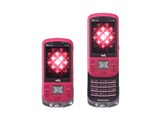

公式オンラインショップ購入時の端末代金
価格情報の登録がありません
発売日:2006年 6月下旬
販売時期:2006年夏モデル 液晶サイズ:2.2インチ 形状:スライド メインカメラ画素数:125万画素 重量:123g




※ランキング順位・レビュー点数・クチコミ件数は機種単位の情報です



















 お気に入りに追加


The au Music Port software has several problems:
1) When you turn on the PC, it hangs for 2 or 3 minutes. After the timeout, the PC continues to work. This is caused by au Music Port. There are no options to disable music port from opening on startup.
2) Error code: 7a01010f - I get this everytime since I upgraded from v2.1 to v2.2. I cannot connect my PC to my w42s.
3) I cant get MP3 onto my keitai. CDs will go on, but not MP3.
Typical Sony product: rubbish.
書込番号:5437003
 0点
0点



日本語版以外のOS使ってるんじゃないの??それが原因では??
書込番号:5444634
0点

まずはsony_is_rubbishさんへの返信ということで英語で失礼。
Hello friend,sony_is_rubbish,
First,problems you have when starting Windows may be caused by au Music Port(amp).
I think your amp is set to start automatically when starting Windows.You had better disable this action.On the indication area (ex:there are mouse configuring icon,volume adjusting icon....etc),there is green icon(or,by onmouse,find icon which indicates[au music port]by popup).Click it by right button and select [自動起動OFF].By these steps,this problem will be cleared.
Second,troubles with error code 7a01010f may concern secutity and anti-virus softwares.It interfares connecting between your PC and mobilephones(by processing this[an unsafe device]).Disable it now from software's interfarling.
to be continued to next...
書込番号:5472274
0点
Also,you should check following points:
1 Have you checked connecting mode?Select[data communicaing mode],not[mass-storage mode].
2 Do not make W42S work when connecting it to PC.Push shut off key twice.
And,I don't know whether upgrading of amp concerns this trouble.I'm sorry.Ask au KDDI by E-mail.
Third,your MP3 files are available by USING MEMORY STICK DUO and Sonicstage CP,another software.Sony Ericsson and au say that amp is for [Chaku-Uta Full]files and ripped files from CD.And,step for transfering MP3s is different from transfering ripped files.
If you want more information,please reply. D-WALKER
書込番号:5472372
0点
Collection:I said not to MAKE W42S WORK but it's wrong.Please make W42S hold off and stop every function.
3レス消費してしまいすいません。。
うほうほうっほーさん、確かXPって多言語対応OSだとどこかで見た気がするんですよ。でもあやしいなあ。auのことだし。
ちなみに英文部はどういう内容だったか要約しますと、質問主は↓
1.ampが自動起動するせい?でPCが起動時に一時的にハングアップして困る。
2.7a01010fのエラーが、ampv2.2アップデート時より発生。そのせいで携帯がPCからはじかれる。
3.MP3聞けないよ・・・CDはいけるのに。
とのこと。
僕なりに返信した内容ですが、↓
1.amp自動起動と常駐ウイルスソフトを解除せよ
2.とりあえず、転送モードと通信時における待ち受け状態を確認してね。バージョンアップのことは知らん
3.・・・言わずもがな。MP3ならSSCPとMSDUOだぞ。
となりました。
書込番号:5472424
0点
Hello again,sony_is_rubbish,
I found more information about failing connection between PC and W42S.
au shop clerk said:
First Switch off a mobile telephone, and please take off a battery.And put on a battery after progress for about 10 seconds after taking it off and switch it on, and please try to be connected to a PC again.
Try also:
At first uninstall an entering USB driver now, and please reboot. Install a driver after reboot, and please reboot again afterwards. Please try to connect a mobile telephone after second reboot.
書込番号:5472439
0点
Thanks for your detailed reply.
I dont get the error anymore, seems like it was a temporary problem.
But still my PC 'hangs' on startup. I tried to turn off the jidouteki startup function, but it didnt work. I have eigoban OS, maybe this is the problem.
In conclusion I want to say this to English-speaking consumers in Japan - This keitai is really nice, but it is not easy to get music onto it and the software is not easy to use. The software is 100% japanese, no english version, so if you speak no japanese then you will find it very difficult to get any music onto your keitai. If you have good japanese, then your only problem will be the slightly buggy software and the copy-protection...
It is not easy to put MP3 onto this keitai. I tried many things, for example converting MP3 to HE-AAC format but I couldnt get it to work. The only way to put MP3 on this is to buy a CD-RW and put the MP3s on that way by tricking it into thinking you have put on an original CD.
Its a nice keitai but I would like Sony to work on this music software by doing this:
1) Give us English menus please (this phone advertises as being available in English, but actually only the phone menu has English, not the related software).
2) Make it easier to add MP3 directly from PC.
書込番号:5500463
0点
I'm very sorry for not replying for long time.
By the way,about hanging up,it should be a fundamental problems with amp and OS(maybe amp is designed for Japanese edition).
Cretainly,in their homepage,au says amp works only upon Windows XP Japanese Edition.(In other words,guarantee is abailable on JP Edition.)So,to tell the truth,you can't help this hanging-up phenomenon.
And it is true for Non-Japanese-Person that amp is difficult to use and get used to.
So,only thing I can say is that ASK ME IF YOU ARE IN TROUBLE!!!!...
I think that au is out of attention with Non-Japanese-Usres or Customers.so you'd better not rely on au.
But,you can try to ask Sony Ericsson Japan,which is grobal mobilephone company.there should be an key to understand phones.
Additionally,about MP3s, as I said before,MP3s are abailable
by using SonicStage CP and Memory Stick Duo.Former is a software to transfer music files(OF COURSE INCLUDING MP3S) to W42S(and other sony's music players etc).To our pity,This softwares in CD-ROM(for W42S)is Japanese Version.Visit English Version site below:
http://musicstore.connect.com/
to get and handle ENGLISH Sonicstage.
Latter is in stores now.Why don't you find(if possible,over 256Mbytes type)this?
It would be convenient for everyone to add MP3s directly,but now, it seems to be impossible.Not only you are confusing this problem,but also EVERYONE IS!I wish this situation will be changed by this....
書込番号:5559058
0点
Collection:
not"abailable" but"available.
And,strictly speaking,W42S is the joint stuff(Music Player for ATRAC3s,Music Player for Chaku-Uta-Fulls(HE-AAC),Camera,phone,etc).Because of this,W42S is impossible to play original MP3 files,as well as LC-AACs.These files are converted by SonicStage into ATRAC3 Files.After that,finally,W42S can be aware of music files.
You are wise to discover one way to put MP3s into W42S.That may be the only way to do so.
By the way,didn't you say that you have tried converting MP3s into HE-AACs?
I'm afraid that,W42S recognizes such HE-AAC Files below,so check it out.
1,HE-AACs with extension .kdr(This proves that"dealed with amp,or genuine downloaded music files by mobilephones")
2.HE-AACs with tags including DRM systems
Your HE-AAC Files may not hit either needs,so W42S didn't recognize them,I think.
書込番号:5559171
0点



このスレッドに書き込まれているキーワード
「SONY > W42S」の新着クチコミ
| 内容・タイトル | 返信数 | 最終投稿日時 |
|---|---|---|
  USBケーブルですが USBケーブルですが |
2 | 2008/09/15 12:36:42 |
  W42Sに戻ってきました! W42Sに戻ってきました! |
1 | 2008/04/09 23:01:24 |
| こんにちは |
2 | 2008/02/01 15:30:51 |
 新規と継続について 新規と継続について |
1 | 2008/01/28 0:18:54 |
  卓上ホルダー 卓上ホルダー |
3 | 2008/01/27 23:06:05 |
 ライブCD ライブCD |
2 | 2008/01/20 20:41:21 |
 外装交換 外装交換 |
0 | 2007/12/21 21:32:27 |
| メモリスティックPRO DUO |
2 | 2007/11/12 12:13:44 |
 アップデート アップデート |
0 | 2007/08/23 20:16:56 |
 スライドすると電源が落ちる スライドすると電源が落ちる |
1 | 2007/08/01 11:46:30 |

クチコミ掲示板検索
新着ピックアップリスト
-
【欲しいものリスト】pc メイン
-
【Myコレクション】MyホワイトPC(良い点悪い点)
-
【欲しいものリスト】あ
-
【質問・アドバイス】a
-
【欲しいものリスト】PC
価格.comマガジン
注目トピックス




(スマートフォン・携帯電話)