



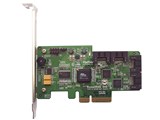


対応バス:PCI-Express 対応インターフェイス:SATAIII/RAID






本ページでは掲載するECサイトやメーカー等から購入実績などに基づいて手数料を受領しています。








RocketRAID 640 (SATA 6Gb/s/RAID)HIGHPOINT
最安価格(税込):¥99,660
(前週比:±0  )
登録日:2010年 3月12日
)
登録日:2010年 3月12日
『Non-RaidのBIOSにしたい』 のクチコミ掲示板







 お気に入りに追加


インターフェイスカード > HIGHPOINT > RocketRAID 640 (SATA 6Gb/s/RAID)


こちらのカードでのRAID0はトホホな結果だったので、Non-RaidのBIOSにしたいと思ってます。
HighpointのホームページからNon-RaidのBIOSをDLし、解凍してみましたが、ReadMeが英語で困ってます。
何となくわかるんですが、失敗したくないので、Non-Raidにされた方や英語の堪能な方教えてください。
以下がReadMeの全文です。
Readme file for RocketRAID 640 Controller BIOS
Copyright (C) HighPoint Technologies, Inc. All rights reserved.
Last updated on Aug 04, 2011.
Please review this file for important information about compatibility issues and
differences in operation that were discovered after our product manuals were
created. In case of conflict among various parts of the documentation set, this
file contains the most current information.
Note: The latest firmware and product documentation will be available for
download at http://www.highpoint-tech.com
This file is divided into the following major sections:
1. Software Version
2. Files Listing
3. Updating BIOS
4. Revision History
1. Software Version
====================
BIOS version: v1.1
2. Files Listing
=================
Readme.txt This file
load.exe Flash utility for DOS
rr640.v11 BIOS image file for RR640
640load.108 Autoloader for RR640
Note: Default setting of BIOS does not support booting from RAID controller.
For booting support, please enalbe INT13 support when flashing BIOS.
Load.exe: Use -c option to enable INT13 support.
3. Updating BIOS
====================
The flash utility (load.exe) is used to update controller BIOS.
load.exe must run under pure DOS environment. It cannot run in a DOS box
on Windows system. You should boot from a DOS floppy without any device
drivers.
The following command line is used to launch the flash utility:
load.exe [options] [filename]
Command line options:
/A Update Autoload.
/Q Silent mode. The program will not prompt for you to
confirm the flashing process.
/V Verbose mode. The program will show more detailed
information about the flashing process.
/S <bus> Only search adapters on specified PCI bus. <bus>
specifies the PCI bus number (a value from 0 to 255).
/D <device> Only search adapters for specified PCI device number.
<device> specifies the PCI device number (a value from
0 to 31).
/C Configure BIOS parameters before updating.
4. Revision History
====================
v1.1 08/04/2011
* First release.
よろしくお願いします。
書込番号:13483989
 0点
0点




DOS起動ディスクからのBIOS更新・設定変更プログラム用の説明しか書かれていませんが
同梱のhptflash.exeはWindows上から実行できるようなのでそちらで実行して下さい。
rr640.v11がBIOSイメージファイルで、Configボタンでいくつか設定項目が出せます。
例えばReadmeに書かれていることだとINT13 supportをDisabledにすれば、接続したディスクから起動できない設定にできます。
書込番号:13484093
 0点
0点
甜さん
ご返事ありがとうございます。
Windowsで実行できるんですね!?
やってみたいと思います。
書込番号:13484129
0点
自己レスです。
Windows上でhptflashを実行しましたが、failedになり失敗しました。
再起動しても、カード読み込みから先に進みませんでした。
non-raidにしようと考えてる方は気を付けてください。
書込番号:13484463
0点



このスレッドに書き込まれているキーワード
「HIGHPOINT > RocketRAID 640 (SATA 6Gb/s/RAID)」の新着クチコミ
| 内容・タイトル | 返信数 | 最終投稿日時 |
|---|---|---|
  何も表示されない;; 何も表示されない;; |
4 | 2013/06/09 19:27:49 |
 RAIDドライブが表示されない現状 RAIDドライブが表示されない現状 |
6 | 2012/05/23 20:19:58 |
 macにて使用できるのでしょうか? macにて使用できるのでしょうか? |
0 | 2012/01/11 5:02:43 |
 左上のピンについて 左上のピンについて |
2 | 2012/01/09 8:52:29 |
 価格が下落していますが? 価格が下落していますが? |
5 | 2011/12/18 19:34:11 |
 RAIDしているドライブのsmart情報について RAIDしているドライブのsmart情報について |
2 | 2011/12/14 13:23:57 |
  オススメ オススメ |
0 | 2011/10/12 17:22:49 |
| Non-RaidのBIOSにしたい |
3 | 2011/09/10 23:31:13 |
 データを無くさないままRAID構成できますか データを無くさないままRAID構成できますか |
2 | 2011/07/05 11:07:15 |
  同じ物ですよね? 同じ物ですよね? |
4 | 2011/08/25 17:04:10 |
「HIGHPOINT > RocketRAID 640 (SATA 6Gb/s/RAID)」のクチコミを見る(全 76件)

この製品の最安価格を見る
 <8
<8
のユーザーが価格変動や値下がり通知、クチコミ・レビュー通知、購入メモ等を利用中です



クチコミ掲示板検索
新着ピックアップリスト
-
【欲しいものリスト】生成AI用
-
【欲しいものリスト】欲しいものリスト
-
【おすすめリスト】時々1440pゲームする人向け
-
【おすすめリスト】おススメ用
-
【欲しいものリスト】新技術お試し機の自作PC
価格.comマガジン
注目トピックス




(パソコン)
インターフェイスカード
(最近5年以内の発売・登録)






